
Become The Go-To AI Person
Microsoft 365 Copilot Course
$399 value - yours for $299 CAD
This course will help business professionals:
✅ Get the answers you actually want with Copilot Chat
✅ Build repeatable workflows that you can use again, and again
✅ Become the go-to AI person on your team — the one coworkers come to when they're stuck

I found this AI training very insightful and practical. It helped me better understand how to integrate AI into my daily work, making processes more efficient and strategic. A great learning experience overall.
- Florence
Struggling to Get Value from Copilot?

“The results are hit or miss”
Sometimes it works great. Sometimes it misses the mark.
Settle for less — answers that aren’t quite what you asked for.

“I’m not sure what to learn next”
There’s constantly something new — but no clear path forward.
Same features — with no idea what else Copilot can actually do.

“I don’t know where to start”
You have Copilot — but no clear idea what to focus on first.
Stuck doing it manually — and asking for help instead of giving it.
The course was packed with excellent content and training. Amy does a great job with her approach, tone, and training style, and I enjoyed the course and have gained many additional tools for fully harnessing the power of Copilot. Highly Recommend.
- Ryan L.
This Is Who You Become
Better Results
You stop settling for close-enough answers and start getting exactly what you needed from Copilot.

Repeatable Workflows
Stop using Copilot for one-off chats, learn to approach Copilot with intention and build repeatable workflows.

The Go-To for AI
Your colleagues turn to you for help with AI, because you know how to actually use it to get the job done.
A very helpful and informative training. I learned so much about Copilot that I was afraid to use so far because of how overwhelming it could be, but it helped enormously.
- Faith
📍Start Here
Do you think Copilot is just a chatbot? Think again.
Copilot can take care of the repetitive, time-consuming work — so you can focus on what actually matters.
Wherever you're starting from, this course gives you a clear, practical path to becoming the person colleagues turn to for help with AI.
🔵 Enroll NowTour the Copilot Solar System
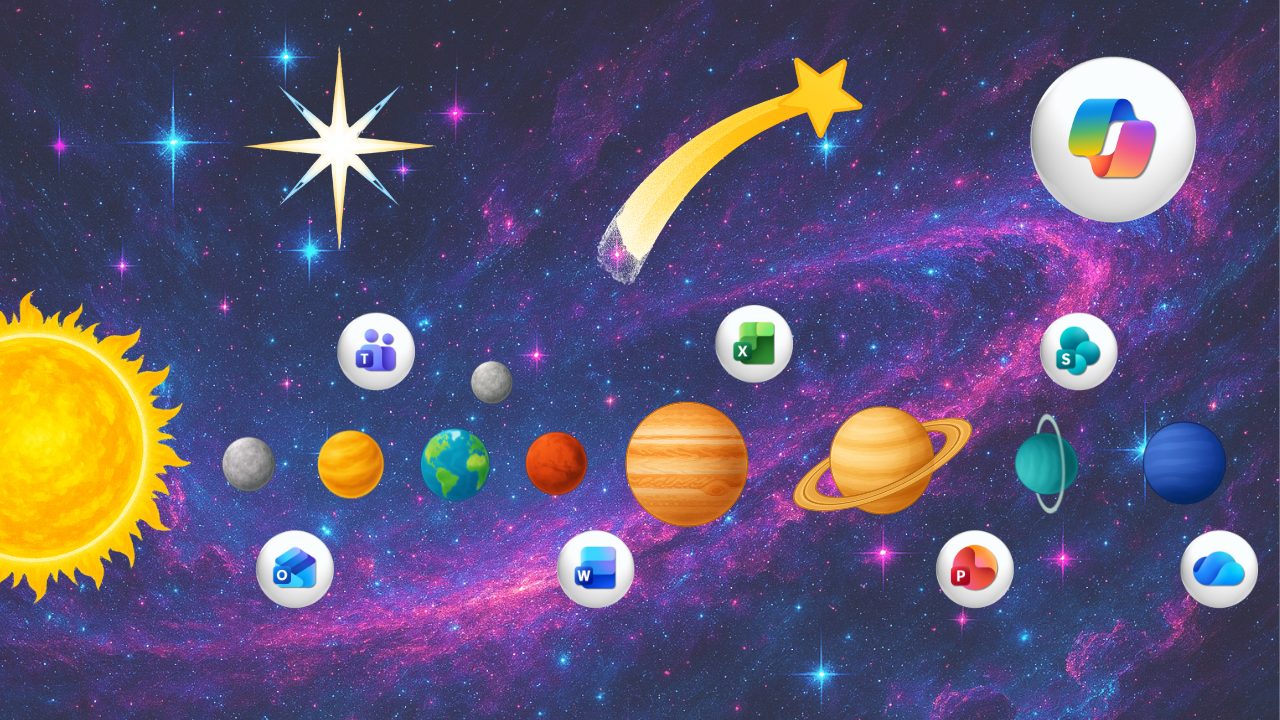
🚀 Workflow Foundations | Mission Control
Turn one-off chats into systems and and uncover some of the most overlooked Copilot features.
☀️ Copilot Workflows | Solar Core
Build repeatable workflows using the Workflow Blueprint.
🪐 Copilot in Everyday Apps | Planetary Orbit
Confidently use Copilot inside of 365 apps including Outlook, Teams and more!
"You are unique in the way you explain difficult technical topics in very simple, easy to understand, language. Thank you for your amazing videos."
- Zul J.
What You'll Learn
A two-part mini course series designed to help you become the go-to AI person at work!
This is where we learn how to approach Copilot with intention, turning one-off prompts into repeatable Workflows and using Copilot as second nature inside of 365 apps.
Each lesson is short, practical, and designed to help you apply what you learn right away.
Building AI Workflows
-
Start Here (7 mins)
6 lessons- Welcome Aboard
- Find Your Copilot Starting Point
- Download Your Copilot Toolkit
- Using AI Responsibly
- Your Copilot Dashboard
- What You'll Learn in this Course
-
Building a Foundation for Better Responses
6 lessons- Welcome to Building a Foundation for Better Responses
- Copilot Settings: Instructions
- Copilot Settings: Memory
- References: Pointing Copilot to the Right Content
- Starting Fresh New Chat vs. Continuing
- Managing Your Conversations
-
Turning Prompts into Systems
5 lessons- Turning Prompts into Systems
- Saving Prompts to the Prompt Gallery
- Scheduling a Prompt (Morning Brief)
- Turning Prompt Responses into Copilot Pages
- Creating Documents with Copilot
-
Exploring Other Copilot Tools
6 lessons- Welcome to Other Copilot Tools
- What are Agents
- My Top Agents
- What are Notebooks
- Search vs. Chat
- Creating Images from Prompts
-
Building Repeatable Workflows
7 lessons- Building Repeatable Workflows
- What Can We Workflow
- Getting Started with Workflows
- The Workflow Framework
- Example: Bring It All Together
- Tips for Better Results
- Troubleshooting Copilot Workflows
-
Checkpoint: Copilot Foundations
3 lessons- Foundations Complete
- Your Biggest Takeaway
- Summary of Course Updates
Copilot in 365 Apps
-
Welcome Module
6 lessons- Welcome to Copilot in 365 Apps
- Your Copilot In 365 Apps Starting Point
- Download Your Copilot Playbook & Practice Files
- How This Course Works
- Get The Most Out Of This Course
- Where Do You Sit?
-
Copilot in Outlook
7 lessons- Welcome to Mercury
- Customizing Copilot in Outlook
- Summarizing Emails with Copilot
- Using Copilot Chat in Outlook
- Drafting Emails with Copilot
- Getting Feedback with Copilot Coach
- Scheduling Meetings with Copilot
-
Copilot in Teams
6 lessons- Welcome to Venus
- Teams Settings and Layout
- Staying on Top of Teams Chats
- Gathering Insights from Channel Conversations
- Copilot Across Meetings
- Meet the Facilitator Agent
-
Copilot in Word
6 lessons- Welcome to Mars
- Setup Your Document
- Drafting Content with Copilot
- Understanding Chat Modes
- Editing and Refining Documents
- Using Copilot Chat in Word
-
Copilot in Excel
5 lessons- Welcome to Jupiter
- Preparing Excel Files for Copilot
- Editing Excel Data
- Visualizing Data with Copilot
- Analyzing Data
-
Copilot in PowerPoint
6 lessons- Welcome to Saturn
- Preparing Presentations for Copilot
- Creating a Presentations with Copilot
- Adding Content to our Presentation
- Editing Content with Copilot
- Other Copilot Features
-
Checkpoint: Copilot in 365 Apps
3 lessons- Reflecting on My Copilot Journey
- Getting My Course Certificate
- Copilot in 365 Apps Complete
-
Bonus: Copilot in SharePoint
4 lessons- Welcome to Uranus
- Accessing SharePoint
- Using Copilot Chat in SharePoint
- Introducing SharePoint Agents
-
Bonus: Copilot in OneDrive
4 lessons- Welcome to Neptune
- Accessing OneDrive
- Making Faster Decisions with Copilot
- Introducing Agents in OneDrive
-
Archive
14 lesson- Using Copilot Chat in Excel
-
Copilot in Word - Archive 26.06
- Editing and Refining Documents
- Using Copilot Chat in Word
- Summarizing Documents with Copilot
- NEW Using Agentic Mode in Word
-
Copilot in Excel - Archive 26.06
- Preparing Excel Files for Copilot
- Working with Formulas Using Copilot
- Visualizing Data with Copilot
- NEW Agentic Mode in Excel
-
Copilot in PowerPoint - Archive 26.06
- Preparing Presentations for Copilot
- Creating Presentations with Copilot
- Adding Content to Slides with Copilot
- Editing and Refining Slide Content
- Using Copilot Chat in PowerPoint
"Short and easy to follow instruction videos. Videos are easy to navigate and for refreshers. Save 3-5 hours per week."
Jenna
Who This Course Is For
🔵 You're tired of settling for answers that aren't quite right.
You're ready for results you can actually use.
🔵 You keep using Copilot for one-off chats.
You're ready to start building repeatable Workflows.
🔵 You're still doing things manually and asking others for help.
You're ready to become the one people turn to instead.
Whether you're brand new to Copilot or ready to go deeper, this course gives you a clear, practical path to becoming the person colleagues turn to for help with AI.




"Love your content, Amy! I am picking up lots of useful info that I am applying at work. Keep up the good work!"
Anonymous
What's Included
Everything you need to use Copilot with confidence — all in one success kit:
✅ Two Mini Courses
A complete system covering fundamentals, prompts, and real‑world application.
✅ 70+ Short Lessons
Short, actionable and easy-to-follow videos designed for quick wins.
✅ Hands-On Activities
Practice as you learn and apply skills immediately.
✅ Ready‑to‑Use Prompts
Copy, customize, and start using Copilot with confidence
✅ Downloadable Resource
A quick-reference guide to support your learning
✅ Future Updates
You’ll receive access to any updates added to the course for new features.
✅ 1-Year Access
Enjoy 12 months of full access.
✅ Certificate of Completion
Receive a downloadable certificate when you finish.

👋 Meet Your Instructor
Hi, I’m Amy, founder of Office Skills with Amy, where I turn the complexity of Microsoft 365 into practical, workflow-driven systems that help you and your team save time and work more effectively. Take a course on your own or enroll your whole team.
👇 Read my full story and meet Roo, my trusty office sidekick 🐾
Proud Microsoft MVP, recognized for elevating how teams work with Microsoft 365 and Copilot.
🔵 Read Full Bio🔴 Over 4.9 Million Views On YouTube
Still Not Sure?
💰 Money Back Guarantee
If you don’t feel the course is a good fit for you, you’re covered by our 14-day money-back guarantee.
You’ll receive a full refund — no exceptions — after completing a short feedback form to help us understand what didn’t work.
We value your input and use it to keep improving the experience for others.
🔵 Join Risk Free Today"Thank you, Amy, you're an awesome teacher. (This is coming from a fellow awesome teacher)"
Wolfgang K.
Frequently Asked Questions
Who is this course for?
What do I need to complete the course?
How long will this course take to complete?
How long do I have access to the course?
What happens if I’m not satisfied?
Still have questions?
💬 Got Questions?
Fill out the form below and we’ll get back to you as soon as we can — usually within a business day.