
Group Training
Microsoft 365 Copilot
What You’ll Get:
✅ Drive Copilot adoption and maximize ROI
✅ Live, hands-on sessions designed for Teams
✅ Training tailored for all skill levels — beginner to advanced

Amy is upbeat, keeping everyone engaged at a good pace. The coverage was great, easy to follow with helpful insights.
Close the Productivity Gap with AI
Today’s organizations face a productivity challenge: leaders want more impact, but teams often feel stretched for time and energy.
Teams that adopt AI are changing the story. Employees in these environments report higher productivity, more time for meaningful work, and greater optimism about the future.
Group training helps your team bridge that gap.
With the 5-Level Launch Kit, your team will learn to integrate Copilot into daily workflows, automate repetitive tasks, and reclaim time for what matters most. Empower your organization to thrive in the AI era.
A very helpful and informative training. I learned so much about Copilot that I was afraid to use so far because of how overwhelming it could be, but it the session helped enormously.
- Faith
Agenda
Meet the 5-Level Launch Kit.
This group training session is designed as a guided journey through the Copilot solar system. Each level represents a key area your team will master—building skills from core fundamentals to advanced, real-world workflows.
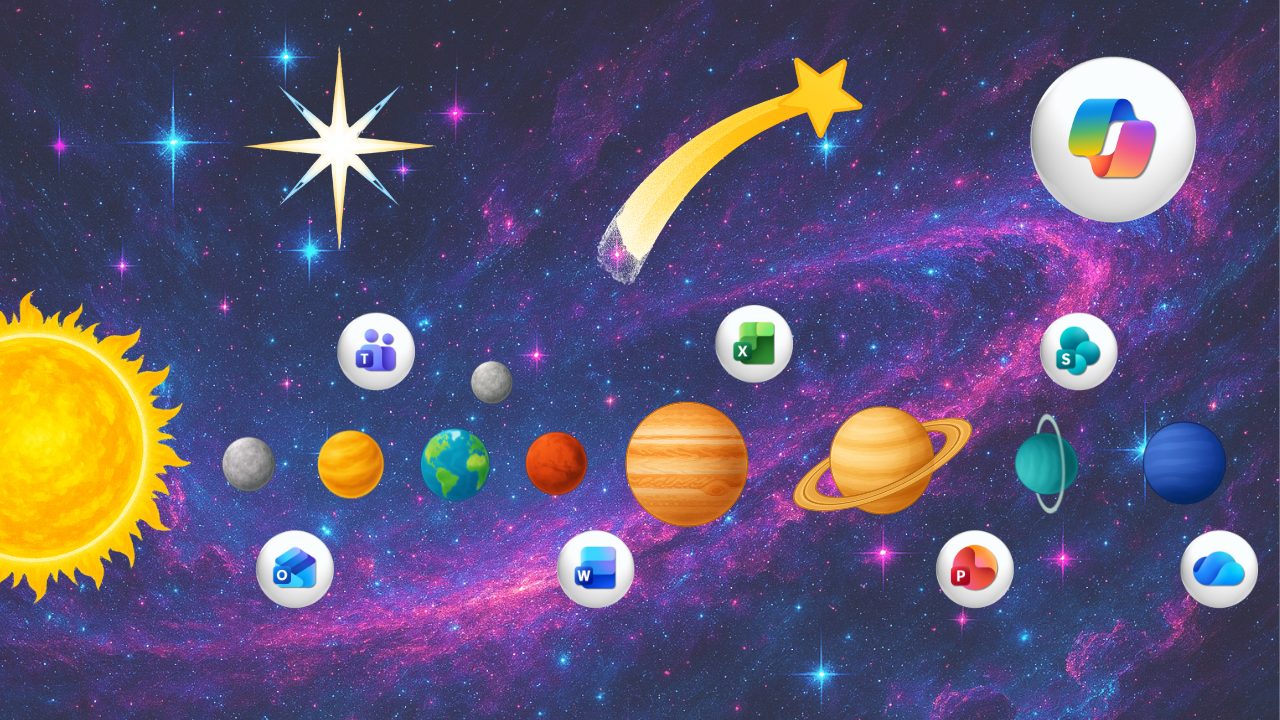
🚀 Level 1 — Fundamentals | Mission Control
Learn Copilot and AI basics. Build a solid foundation.
☀️ Level 2 — Prompt Foundations | Solar Core
Master Copilot Chat and the CLEAR Formula for prompts.
🪐 Level 3 — Everyday Apps | Planetary Orbit
Use Copilot in 365 apps including Outlook, Teams and more!
🛰️ Level 4 — Advanced Tools | The Stars
Explore Notebooks and Agents for advanced organization.
✨ Level 5 — Real-life Workflows | Shooting Stars
Apply real-world workflows to boost productivity and collaboration.
I found this AI training very insightful and practical. It helped me better understand how to integrate AI into my daily work, making processes more efficient and strategic. A great learning experience overall.
- Florence
How Group Training Works
Live via Microsoft Teams. Interactive. Beginner-friendly.

Duration:
6 hours

Group Size:
Small to medium size teams
Standard session rate includes 10 team members. Larger teams can be accommodated by splitting sessions or customizing the format.
Resources Included:
Session guide and recording
Each session comes with a downloadable session guide and full recording, so your team can revisit key takeaways anytime.
Help your team work smarter with Microsoft 365 Copilot.
🟡 Get StartedWho Is Group Training For?
Designed for organizations ready to drive AI adoption and maximize ROI with live, interactive Copilot training.
🔵 Accelerate Copilot and AI adoption across teams
🔵 Increase ROI and productivity with hands-on learning
🔵 Learn together in live sessions with Q&A and real-world examples


"Amy you are amazing. I'm an instructor myself and I love and appreciate your instructional style."
Michel W.
How to Book Your Group Training Session
Step 1: Submit Your Inquiry
Share a few details about your team and training goals.
Step 2: Tailor Your Session & Receive a Quote
We’ll customize the training to your needs and provide a quote.
Step 3: Schedule Your Session
Choose a date and time that works for your team.
Step 4: Complete Payment
Secure your booking with easy online payment.
Participate via Teams and get your session recording and guide for ongoing learning.
🔴 Over 3.7 Million Views On YouTube

👋 Meet Your Instructor
Hi, I’m Amy — founder of Office Skills with Amy, where I empower businesses to streamline their Microsoft 365 workflows through practical tutorials, online courses and personalized coaching.
👇Read my full story and meet Roo, my trusty office sidekick 🐾
Proud Microsoft MVP, recognized for elevating how teams work with Microsoft 365 and Copilot.
🔵Read Full Bio
"You explain everything so simply and slow enough to keep up. Thank you!"
Debbie D.